
Staff Payroll History
Staff Payroll History Report
The Staff Payroll History Report in Aegis PMS provides a complete record of all posted salary transactions. This report helps HR and payroll administrators review past payroll data, monitor salary distributions, and generate department-wise or staff-wise summaries for reporting and audit purposes.
Accessing the Report
Location: HRM → Setup → Staff Payroll History
-
The report screen will display options for generating payroll history in either Detail View or Summary View.
Report Views
1. Detail View
-
Shows individual payroll transactions for each staff member
-
Includes fields such as:
-
Staff Name
-
Department
-
Fiscal Year & Month
-
Addition & Deduction heads
-
Gross Salary
-
Tax & Net Salary
-
-
Ideal for:
-
Exporting to Excel
-
Manual reconciliation
-
Detailed audits
-
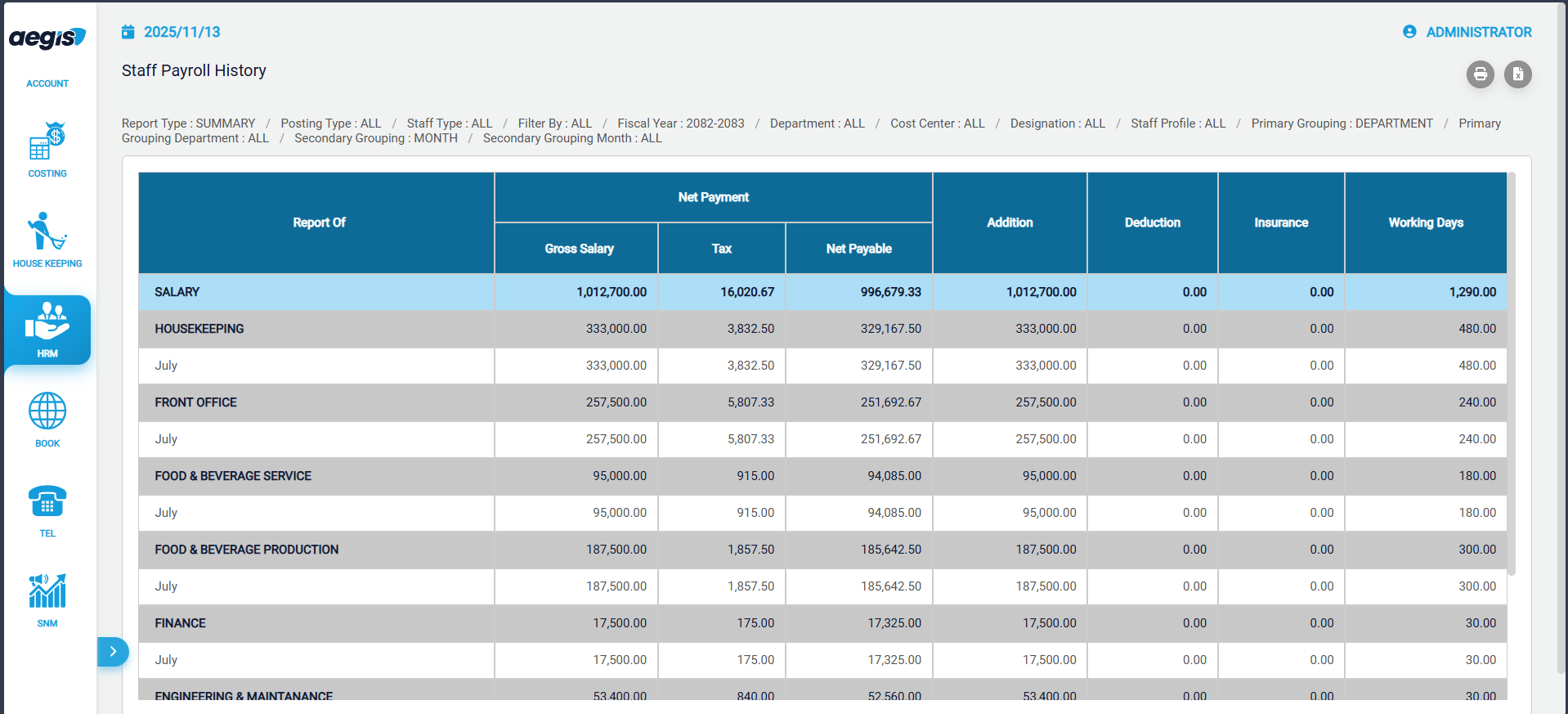
2. Summary View
-
Groups payroll data based on selected criteria such as:
-
Department
-
Staff
-
Month
-
-
Shows total salary, total deductions, and other summary metrics
-
Ideal for:
-
Quick analysis
-
Departmental reports
-
Management review
-
Ex - Grouped By : Department
Generating the Report
-
Select the View Type: Detail or Summary
-
Apply filters as required:
-
Fiscal Year
-
Month
-
Department
-
Staff
-
-
Click Load Report or press ALT + L to generate the report
Export & Printing Options
-
Export: Export report data to Excel for further analysis or record-keeping
-
Print: Print a copy of the report for manual filing or distribution
Use Cases
-
Track historical salary payments for staff
-
Verify payroll accuracy for audits
-
Generate reports for management or accounting purposes
-
Analyze payroll trends by department or time period
Tip: Use the Detail View for granular checks and the Summary View for high-level reporting.
No Comments